> ## Documentation Index
> Fetch the complete documentation index at: https://docs.into.space/llms.txt
> Use this file to discover all available pages before exploring further.

# Leverage

> How leverage multiplies your exposure

export const LeverageImpactChart = () => {
  const [hoveredLine, setHoveredLine] = useState(null);
  const [mousePos, setMousePos] = useState(null);
  const [isTouching, setIsTouching] = useState(false);
  const [isVisible, setIsVisible] = useState(false);
  const svgRef = useRef(null);
  const containerRef = useRef(null);
  useEffect(() => {
    const observer = new IntersectionObserver(([entry]) => {
      if (entry.isIntersecting) {
        setIsVisible(true);
      }
    }, {
      threshold: 0.2
    });
    if (containerRef.current) {
      observer.observe(containerRef.current);
    }
    return () => observer.disconnect();
  }, []);
  const generateLeverageData = leverage => {
    const points = [];
    const entryPrice = 15;
    for (let i = 0; i <= 100; i++) {
      const marketProb = i;
      const newPrice = marketProb;
      const profitPerShare = newPrice - entryPrice;
      const returnPercent = profitPerShare / entryPrice * 100;
      const leveragedReturn = returnPercent * leverage;
      const svgX = 80 + marketProb / 100 * 480;
      const svgY = 320 - leveragedReturn / 800 * 280;
      points.push({
        marketProb,
        pnl: Math.round(leveragedReturn),
        svgX,
        svgY,
        leverage
      });
    }
    return points;
  };
  const leverageLines = [{
    leverage: 1,
    color: '#FFFFFF',
    label: 'No Leverage'
  }, {
    leverage: 3,
    color: '#8CC9F0',
    label: '3× Leverage'
  }, {
    leverage: 5,
    color: '#5AB4E8',
    label: '5× Leverage'
  }, {
    leverage: 10,
    color: '#2C9EDD',
    label: '10× Leverage'
  }];
  const allLines = leverageLines.map(line => {
    const points = generateLeverageData(line.leverage);
    return {
      ...line,
      points,
      pathData: points.map((p, i) => `${i === 0 ? 'M' : 'L'} ${p.svgX} ${p.svgY}`).join(' ')
    };
  });
  const updateInteraction = (clientX, clientY) => {
    if (!svgRef.current) return;
    const rect = svgRef.current.getBoundingClientRect();
    const svgX = (clientX - rect.left) / rect.width * 600;
    const svgY = (clientY - rect.top) / rect.height * 400;
    if (svgX >= 80 && svgX <= 560 && svgY >= 40 && svgY <= 320) {
      if (!isTouching) {
        setMousePos({
          x: svgX,
          y: svgY
        });
      }
      const marketProb = Math.round((svgX - 80) / 480 * 100);
      let closestLine = null;
      let minDistance = Infinity;
      allLines.forEach(line => {
        if (line.points[marketProb]) {
          const distance = Math.abs(svgY - line.points[marketProb].svgY);
          if (distance < minDistance && distance < 50) {
            minDistance = distance;
            closestLine = {
              ...line,
              point: line.points[marketProb]
            };
          }
        }
      });
      setHoveredLine(closestLine);
    } else {
      if (!isTouching) {
        setMousePos(null);
      }
      setHoveredLine(null);
    }
  };
  const handleMouseMove = e => {
    if (!isTouching) {
      updateInteraction(e.clientX, e.clientY);
    }
  };
  const handleMouseLeave = () => {
    if (!isTouching) {
      setMousePos(null);
      setHoveredLine(null);
    }
  };
  const handleTouchStart = e => {
    e.preventDefault();
    setIsTouching(true);
    const touch = e.touches[0];
    updateInteraction(touch.clientX, touch.clientY);
  };
  const handleTouchMove = e => {
    e.preventDefault();
    const touch = e.touches[0];
    updateInteraction(touch.clientX, touch.clientY);
  };
  const handleTouchEnd = () => {
    setIsTouching(false);
    setMousePos(null);
    setTimeout(() => {
      if (isTouching === false) {
        setHoveredLine(null);
      }
    }, 3000);
  };
  const getTooltipProps = line => {
    if (!line || !line.point) return {};
    let x = line.point.svgX - 60;
    let y = line.point.svgY - 60;
    if (x < 10) x = 10;
    if (x > 470) x = 470;
    if (y < 10) y = line.point.svgY + 20;
    return {
      x,
      y
    };
  };
  const tooltipProps = getTooltipProps(hoveredLine);
  return <div ref={containerRef} className="w-full max-w-full">
      <div className="text-center mb-0">
        <h2 className="text-xl font-semibold mb-0">Leverage Impact on PnL</h2>
        <p className="text-sm opacity-70">Market Example: US Government Shutdown</p>
      </div>
      
      <div className="w-full">
        <svg ref={svgRef} width="100%" height="auto" viewBox="0 0 600 400" preserveAspectRatio="xMidYMid meet" className="bg-transparent cursor-crosshair w-full h-auto touch-none" style={{
    minHeight: '300px',
    maxHeight: '500px'
  }} onMouseMove={handleMouseMove} onMouseLeave={handleMouseLeave} onTouchStart={handleTouchStart} onTouchMove={handleTouchMove} onTouchEnd={handleTouchEnd}>
          <defs>
            <linearGradient id="gradient1x" x1="0%" y1="0%" x2="0%" y2="100%">
              <stop offset="0%" stopColor="#FFFFFF" stopOpacity="0.4">
                <animate attributeName="stop-opacity" values="0.4;0.5;0.4" dur="4s" repeatCount="indefinite" />
              </stop>
              <stop offset="100%" stopColor="#FFFFFF" stopOpacity="0.067">
                <animate attributeName="stop-opacity" values="0.067;0.1;0.067" dur="4s" repeatCount="indefinite" />
              </stop>
            </linearGradient>
            <linearGradient id="gradient3x" x1="0%" y1="0%" x2="0%" y2="100%">
              <stop offset="0%" stopColor="#8CC9F0" stopOpacity="0.4">
                <animate attributeName="stop-opacity" values="0.4;0.5;0.4" dur="4s" repeatCount="indefinite" />
              </stop>
              <stop offset="100%" stopColor="#8CC9F0" stopOpacity="0.067">
                <animate attributeName="stop-opacity" values="0.067;0.1;0.067" dur="4s" repeatCount="indefinite" />
              </stop>
            </linearGradient>
            <linearGradient id="gradient5x" x1="0%" y1="0%" x2="0%" y2="100%">
              <stop offset="0%" stopColor="#5AB4E8" stopOpacity="0.4">
                <animate attributeName="stop-opacity" values="0.4;0.5;0.4" dur="4s" repeatCount="indefinite" />
              </stop>
              <stop offset="100%" stopColor="#5AB4E8" stopOpacity="0.067">
                <animate attributeName="stop-opacity" values="0.067;0.1;0.067" dur="4s" repeatCount="indefinite" />
              </stop>
            </linearGradient>
            <linearGradient id="gradient10x" x1="0%" y1="0%" x2="0%" y2="100%">
              <stop offset="0%" stopColor="#2C9EDD" stopOpacity="0.4">
                <animate attributeName="stop-opacity" values="0.4;0.5;0.4" dur="4s" repeatCount="indefinite" />
              </stop>
              <stop offset="100%" stopColor="#2C9EDD" stopOpacity="0.067">
                <animate attributeName="stop-opacity" values="0.067;0.1;0.067" dur="4s" repeatCount="indefinite" />
              </stop>
            </linearGradient>
            <pattern id="leverageGrid" width="60" height="35" patternUnits="userSpaceOnUse">
              <path d="M 60 0 L 0 0 0 35" fill="none" stroke="currentColor" strokeWidth="1" strokeDasharray="3,3" opacity="0.3" />
            </pattern>
            <filter id="dropShadow">
              <feDropShadow dx="0" dy="2" stdDeviation="3" floodOpacity="0.3" />
            </filter>
            <clipPath id="chartClip">
              <rect x="80" y="40" width="480" height="280" />
            </clipPath>
          </defs>
          
          {}
          <rect width="480" height="280" x="80" y="40" fill="url(#leverageGrid)" />
          
          {}
          {mousePos && <g opacity="0.5">
              <line x1="80" y1={mousePos.y} x2="560" y2={mousePos.y} stroke="currentColor" strokeWidth="1" strokeDasharray="2,2" />
              <line x1={mousePos.x} y1="40" x2={mousePos.x} y2="320" stroke="currentColor" strokeWidth="1" strokeDasharray="2,2" />
            </g>}
          
          {}
          <line x1="80" y1="320" x2="560" y2="320" stroke="currentColor" strokeWidth="2" opacity="0.6" />
          <line x1="80" y1="40" x2="80" y2="320" stroke="currentColor" strokeWidth="2" opacity="0.6" />
          
          {}
          <line x1="80" y1="320" x2="560" y2="320" stroke="currentColor" strokeWidth="1" strokeDasharray="5,5" opacity="0.4" />
          
          {}
          <line x1="152" y1="40" x2="152" y2="320" stroke="currentColor" strokeWidth="2" strokeDasharray="8,4" opacity="0.6">
            <animate attributeName="stroke-dashoffset" values="0;12" dur="1.5s" repeatCount="indefinite" />
          </line>
          
          {}
          <g clipPath="url(#chartClip)">
            {[...allLines].reverse().map((line, index) => {
    const gradientId = `gradient${line.leverage}x`;
    const areaPath = `${line.pathData} L 560 320 L 80 320 Z`;
    const originalIndex = allLines.length - 1 - index;
    const drawDelay = originalIndex === 3 ? 1.0 : originalIndex * 0.4;
    return <g key={index}>
                  <path d={areaPath} fill={`url(#${gradientId})`} opacity={hoveredLine && hoveredLine.leverage !== line.leverage ? 0.3 : 1} className="transition-all duration-300" style={{
      animation: isVisible ? `fadeIn 1.6s ease-out ${drawDelay}s both` : 'none'
    }} />
                  <path d={line.pathData} fill="none" stroke={line.color} strokeWidth={hoveredLine?.leverage === line.leverage ? "4" : "3"} className="transition-all duration-300" opacity={hoveredLine && hoveredLine.leverage !== line.leverage ? 0.4 : 1} strokeDasharray="1200" strokeDashoffset={isVisible ? "0" : "1200"} style={{
      transition: isVisible ? `stroke-dashoffset 3s ease-out ${drawDelay}s` : 'none'
    }} />
                </g>;
  })}
          </g>
          
          {}
          {allLines.map((line, index) => {
    const breakevenPoint = line.points[15];
    const isHovered = hoveredLine && hoveredLine.leverage === line.leverage;
    return <g key={`breakeven-${index}`}>
                <circle cx={breakevenPoint.svgX} cy={breakevenPoint.svgY} r="5" fill={isHovered ? line.color : "currentColor"} stroke="#ffffff" strokeWidth="2" opacity={isHovered ? 0.9 : 0.4} className="transition-all duration-300" />
              </g>;
  })}
          
          {}
          {allLines.map((line, index) => <g key={`interactive-${index}`}>
              {line.points.filter((_, i) => i % 2 === 0).map((point, i) => <circle key={i} cx={point.svgX} cy={point.svgY} r="8" fill="transparent" className="cursor-pointer" />)}
            </g>)}
          
          {}
          <text x="80" y="340" fill="currentColor" fontSize="12" textAnchor="middle" opacity="0.7">0</text>
          <text x="152" y="340" fill="currentColor" fontSize="12" textAnchor="middle" opacity="0.9" fontWeight="bold">15</text>
          <text x="200" y="340" fill="currentColor" fontSize="12" textAnchor="middle" opacity="0.7">20</text>
          <text x="280" y="340" fill="currentColor" fontSize="12" textAnchor="middle" opacity="0.7">40</text>
          <text x="360" y="340" fill="currentColor" fontSize="12" textAnchor="middle" opacity="0.7">60</text>
          <text x="440" y="340" fill="currentColor" fontSize="12" textAnchor="middle" opacity="0.7">80</text>
          <text x="560" y="340" fill="currentColor" fontSize="12" textAnchor="middle" opacity="0.7">100</text>
          
          {}
          <text x="70" y="325" fill="currentColor" fontSize="12" textAnchor="end" opacity="0.7">0</text>
          <text x="70" y="250" fill="currentColor" fontSize="12" textAnchor="end" opacity="0.7">200</text>
          <text x="70" y="180" fill="currentColor" fontSize="12" textAnchor="end" opacity="0.7">400</text>
          <text x="70" y="110" fill="currentColor" fontSize="12" textAnchor="end" opacity="0.7">600</text>
          <text x="70" y="45" fill="currentColor" fontSize="12" textAnchor="end" opacity="0.7">800</text>
          
          {}
          <text x="320" y="370" fill="currentColor" fontSize="14" textAnchor="middle" opacity="0.8">Market Probability (%)</text>
          <text x="30" y="180" fill="currentColor" fontSize="14" textAnchor="middle" transform="rotate(-90 30 180)" opacity="0.8">PnL of Margin (%)</text>
          
          {}
          <g transform="translate(420, 60)">
            {leverageLines.map((line, index) => <g key={index} transform={`translate(0, ${index * 20})`}>
                <line x1="0" y1="0" x2="20" y2="0" stroke={line.color} strokeWidth="3" />
                <text x="25" y="4" fill="currentColor" fontSize="12" opacity="0.8">{line.label}</text>
              </g>)}
            <line x1="0" y1="80" x2="20" y2="80" stroke="currentColor" strokeWidth="2" strokeDasharray="4,4" opacity="0.6" />
            <text x="25" y="84" fill="currentColor" fontSize="12" opacity="0.8">Entry</text>
          </g>
          
          {}
          {hoveredLine && hoveredLine.point && <g filter="url(#dropShadow)">
              <rect x={tooltipProps.x} y={tooltipProps.y} width="120" height="55" fill="#1a1a1a" stroke={hoveredLine.color} strokeWidth="2" rx="6" opacity="0.95" />
              <text x={tooltipProps.x + 60} y={tooltipProps.y + 18} fill="#ffffff" fontSize="12" textAnchor="middle" fontWeight="500">
                {hoveredLine.point.marketProb}% probability
              </text>
              <text x={tooltipProps.x + 60} y={tooltipProps.y + 32} fill={hoveredLine.color} fontSize="12" textAnchor="middle" fontWeight="500">
                {hoveredLine.label}
              </text>
              <text x={tooltipProps.x + 60} y={tooltipProps.y + 46} fill={hoveredLine.color} fontSize="12" textAnchor="middle" fontWeight="bold">
                {hoveredLine.point.pnl > 0 ? '+' : ''}{hoveredLine.point.pnl}% PnL
              </text>
            </g>}
        </svg>
      </div>
      
      <style jsx>{`
        @keyframes fadeIn {
          from {
            opacity: 0;
          }
          to {
            opacity: 1;
          }
        }
      `}</style>
    </div>;
};

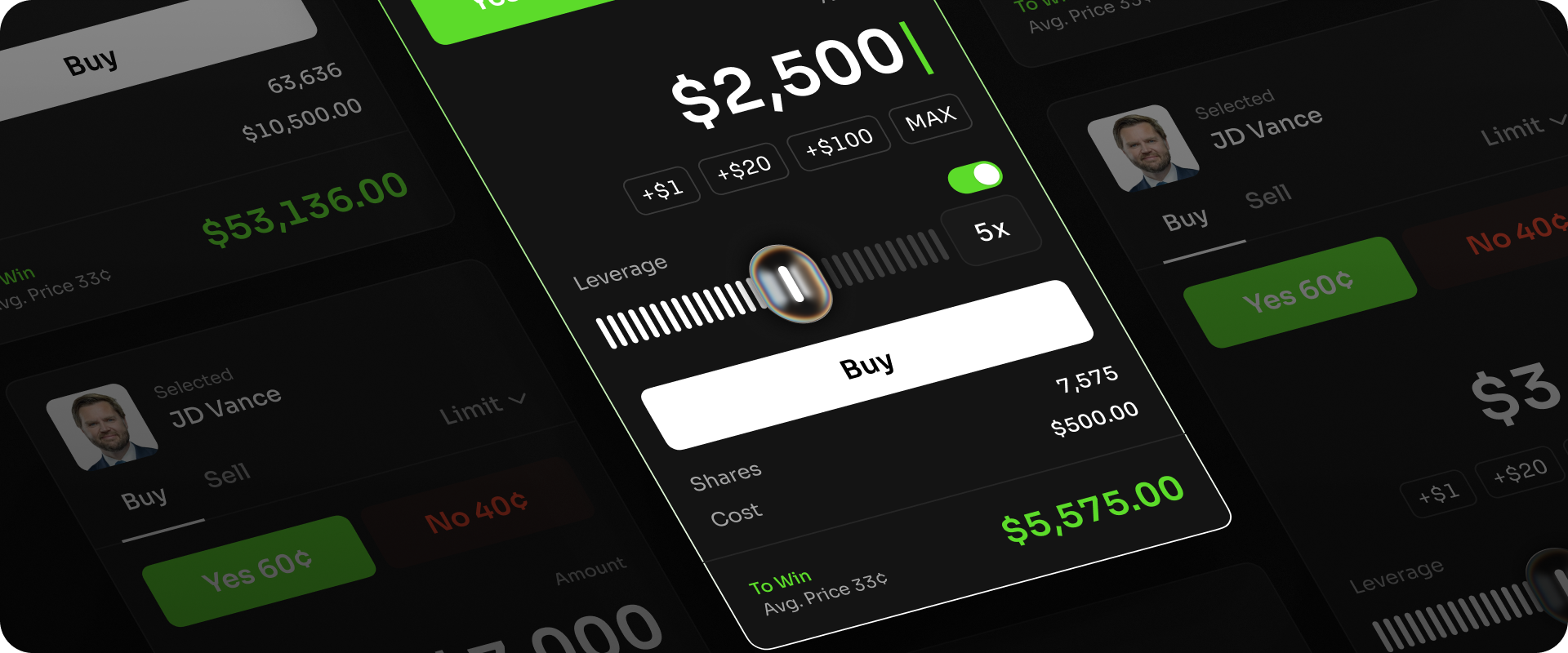
Leverage allows you to amplify your potential returns when trading on Space. Instead of paying the full amount for your position upfront, you can use a fraction of the total value as collateral - giving you exposure to a larger position size. With each prediction you choose the price and amount of shares you wish to buy. With leverage, you're able to buy more shares with your capital and gain greater exposure to the market.

<img src="https://mintcdn.com/space-e3c79028/CIUZlKX_xhH1KYYN/images/leverage.png?fit=max&auto=format&n=CIUZlKX_xhH1KYYN&q=85&s=3f6c00ece32ddd3a9875a84eb1829fd1" alt="Leverage Pn" width="1920" height="800" data-path="images/leverage.png" />

**Example Market:** *"Will the U.S. government shut down before the end of the year?"*\
**Current Market Probability:** 15% (YES shares priced at \$0.15)

* You decide to buy 1,000 YES shares at \$0.15.
* Without leverage, that costs \$150.
* With 5× leverage, you only need to deposit \$30 as margin (20% of the position value).
* If the market shifts to 30% (\$0.30), your position doubles in value - now worth \$300, giving you a \$150 profit on just \$30 margin (500% ROE).
* But if the odds fall to ≈13.33% (≈\$0.13), your position would be liquidated.

<LeverageImpactChart />